Pianote is worth it if you learn best from teacher-led video lessons and want feedback from people rather than an app. The catch is that this feedback is not instant like an app scoring each note. We score it 4/5: pick lessons only at $229 a year unless you want the licensed song library with its transcriptions and practice tools, which needs the $279 plan with songs.
Pianote teaches through follow-along video: a teacher sits at the keys, explains the idea, then plays through every repetition with you. It is the piano side of Musora, so one membership also covers guitar, drums, singing and bass.
That teacher-led format is why Pianote has a place in our ranked guide to online piano lessons, as the pick for learning from a teacher on video. The trade-off is that the help on your playing comes from people, through mentors and weekly live Q&As, rather than from an app scoring each note.
4/5
- 7-dayfree trial on every plan
- 90-daymoney back for first-time members
- Weeklylive lessons and Q&As
- 5instruments in one membership
- $279a year with songs
- $229a year, lessons only
Pianote teaches piano through follow-along video lessons with a teacher on screen, backed by mentors and weekly live Q&As. It suits adults who learn best from a person explaining each step, though feedback on your playing comes from people rather than an app scoring every note.
- Best for
Adult beginners and improvers who want a teacher’s voice, a set path and human support
- Less suited
Learners who want instant, automatic note feedback in every lesson
- Keyboard
A keyboard with at least 61 keys or an acoustic piano; no MIDI or cables needed
- Trial
7 day free trial on monthly and yearly plans, plus a 90 day money back guarantee
- Price
With songs $30 monthly or $279 yearly; Lessons only $25 monthly or $229 yearly; US prices
Who it’s for
Pianote suits adults and teens who learn best from a person explaining each step. Members must be at least 16, and under 18s need a parent or guardian’s consent.
A good fit if you
- Want a teacher’s voice and face, not a game screen.
- Like a set path that tells you what to practice each day.
- Would use mentors and weekly live Q&As to stay on track.
- Practice on an acoustic piano or a keyboard without MIDI.
- Might also want to try guitar, drums, singing or bass on the same membership.
A limited fit if you
- Want instant, automatic feedback on every note you play.
- Want a one-time payment rather than a subscription.
- Are buying for a young child who would practice alone, since the teachers are not live in the room.
What sets it apart
Pianote is built around three ideas that shape each practice session.

The lesson is the practice
Every lesson is follow-along: you press play, and the instructor walks you through each repetition on screen. Daily sessions run about 12 to 15 minutes, so there is no separate homework to remember.
Three skills in every session
Each session mixes a familiar rhythm, a new technique and a short musical phrase. That keeps practice varied and ties new skills to real music straight away.
People behind the videos
Coaches build the courses, while Musora Mentors work with you one to one, at no extra cost. Mentors put together lesson and practice plans, give constructive feedback and answer questions by email or in the app.

How we evaluated Pianote
We reviewed Pianote’s Method, artist courses, song tools, mentor support and live lessons. We also checked plans, US prices, the trial, refund terms and device support.
We compared it on the four factors in how we score lesson platforms. For setup and ease of use, we assessed sign-up, devices and gear needs. For quality of lessons and teachers, we looked at the follow-along format, the teachers and the human support around them.
For range of content, we compared the Method’s units, the artist courses and the song library. For useful features, we weighed practice tools, progress tracking, offline use and how feedback reaches you.
Our scores
- Setup and ease of use: 4.5/5. It runs in a browser and in the Musora app, and lessons need no MIDI, cables or extra software. A keyboard with at least 61 keys or an acoustic piano is enough.
- Quality of lessons and teachers: 4.5/5. Follow-along videos with a teacher playing every repetition, plus mentors and weekly live Q&As for questions.
- Range of content: 4/5. A path from first notes to advanced playing, artist courses in jazz, blues, harmony and technique, and a song library on the plan with songs.
- Useful features: 3.5/5. Tempo control, loops, hand-by-hand song breakdowns, progress tracking and offline lessons in the app. Feedback on your playing comes from people, so it is not instant.
- Overall: 4/5.
The overall score is the average of the four factor scores, rounded to the nearest half point.
What you need to use Pianote
You need a piano or keyboard and a device to watch on. Nothing has to connect to your instrument.
Instrument
- A keyboard with at least 61 keys, or an acoustic piano.
- No MIDI, cables or extra software for the lessons.
Devices
- A web browser on a computer. Chrome is the most compatible, and current Firefox, Edge and Safari on Mac also work.
- The Musora app for iPhone and iPad with iOS or iPadOS 16.4 or later, and for Android phones and tablets.
- Offline viewing in the app, for practice without a connection.
Lessons and support are in English. One Pianote course, Master Harmony, is also available in Spanish.
Getting started
Sign up for the 7 day trial, then open the Method rather than browsing at random. The first unit is built for complete beginners.
First week checklist
- Set up a keyboard or piano where you can see the screen clearly.
- Start the first unit of the Method and follow along for one 12 to 15 minute session a day.
- Email the mentor team with your goals and ask for a practice plan.
- Check the schedule for the week’s live lessons and Q&As, and bring one question.
- If you chose the plan with songs, try one song tutorial at slow tempo.
Curriculum deep dive
Pianote’s curriculum is called the Method. It runs in stages from Beginner Fundamentals and First Real Songs to Intermediate Technique and Advanced Playing.
First steps
The first unit aims to take you, in about 10 days, from never touching the keys to playing with both hands, a first chord progression and a first full piece. The next units widen your reach across the keyboard, then add triads, eighth notes and arpeggios.
Theory, style and expression
Later units teach theory through real music, including Hanon exercises, chord formulas and harmony. Others explore the 12 bar blues, Moonlight Sonata and 7th chords, classical reading with dynamics, pop accompaniment with sus chords, boogie and shuffle blues, and the waltz.
Artist courses
Alongside the Method, specialist courses go deeper on one skill. Jordan Rudess leads 30 Days to Better Technique, Jesús Molina teaches Master Harmony, and Kevin Castro runs 30 day courses in jazz and blues piano.

Lisa Witt
Lisa Witt is the face of Pianote and leads beginner courses such as New Piano Players Start Here, Easy Chords and Read Music In 30 Days. Her short lesson Create Emotion With 3 Notes gives a fair taste of the teaching style.
Songs and practice tools
The song library comes with the plan with songs, because the songs are licensed. Each tutorial is professionally transcribed, with highlighted keys and right and left hand breakdowns.
- Tempo control: slow a song down to practice at your speed.
- Loops: repeat the tricky parts.
- Easy versions: start with a simpler arrangement.
- Sheet music: download it for offline use.
- Mix control: remove an instrument from the backing so you play that part.
Progress and habits
The progress tracker logs lessons, practice sessions and performances, and streaks track daily and weekly consistency. The default goal is 15 minutes a day, and you can log practice done away from the app.
Does Pianote actually correct your playing?
Yes, through people rather than the app. Lessons need no MIDI, cables or extra software, and Musora says the interaction happens with its instructors and mentors. On our three-way split of automatic feedback, asynchronous instructor video and live lessons, Musora’s Student Review service is asynchronous instructor video feedback, and its live sessions are group broadcasts.
Student Reviews from a mentor
Musora’s Student Review service lets you send a YouTube link to a recording of your playing, and a Musora Mentor comments on posture and position, hand and finger placement, articulation and dynamics, and timing and rhythm. Replies come as a video, in writing or as a quick call, and most are returned within ten business days. Confirm that your chosen plan includes Student Reviews before subscribing.
Live lessons and Q&As
Weekly live lessons and Q&As are interactive broadcasts where you can ask a teacher questions, with past sessions archived. They are group sessions, not one-to-one lessons.
For someone to hear you play every week, Musora VIP is a paid add-on that requires a membership and an application. It runs 60 minute small-group video sessions with a mentor, including feedback sessions, and comes with a 30 day refund window.
Our advice: record yourself and practice with a metronome between reviews, so you can check steady timing and dynamics yourself. If your plan includes Student Reviews, send one every 4 to 6 weeks, as Musora suggests, or pick Flowkey or Playground Sessions if you want an app that checks your notes in every session.
Community
Members also get a community forum for sharing progress and joining practice challenges. It adds encouragement between lessons, alongside the mentors.
Pros and cons
Where it’s strong
- Follow-along video lessons with a teacher playing every repetition
- Mentors for lesson plans and feedback at no extra cost
- Weekly live lessons and Q&As, with archives
- No MIDI or cables needed; any 61 key keyboard or acoustic piano works
- 7 day free trial and a 90 day money back guarantee for first-time members
- One membership covers piano, guitar, drums, singing and bass
Where it falls short
- Feedback on your playing comes from people, so it is not instant
- Songs need the more expensive plan
- Weekly small-group feedback sessions cost extra through Musora VIP
- Subscription only for the song library
- Members must be 16 or older
Price, trial and refund
A Pianote membership is a Musora membership, sold with or without the song library and billed monthly or yearly. The table shows regular US prices.
| Plan | Regular US price | Works out at | Trial | Refund |
|---|---|---|---|---|
| With songs, monthly | $30 a month | $30 a month | 7 day free trial | 90 days for first-time members |
| With songs, yearly | $279 a year | $23.25 a month | 7 day free trial | 90 days for first-time members |
| Lessons only, monthly | $25 a month | $25 a month | 7 day free trial | 90 days for first-time members |
| Lessons only, yearly | $229 a year | $19.08 a month | 7 day free trial | 90 days for first-time members |
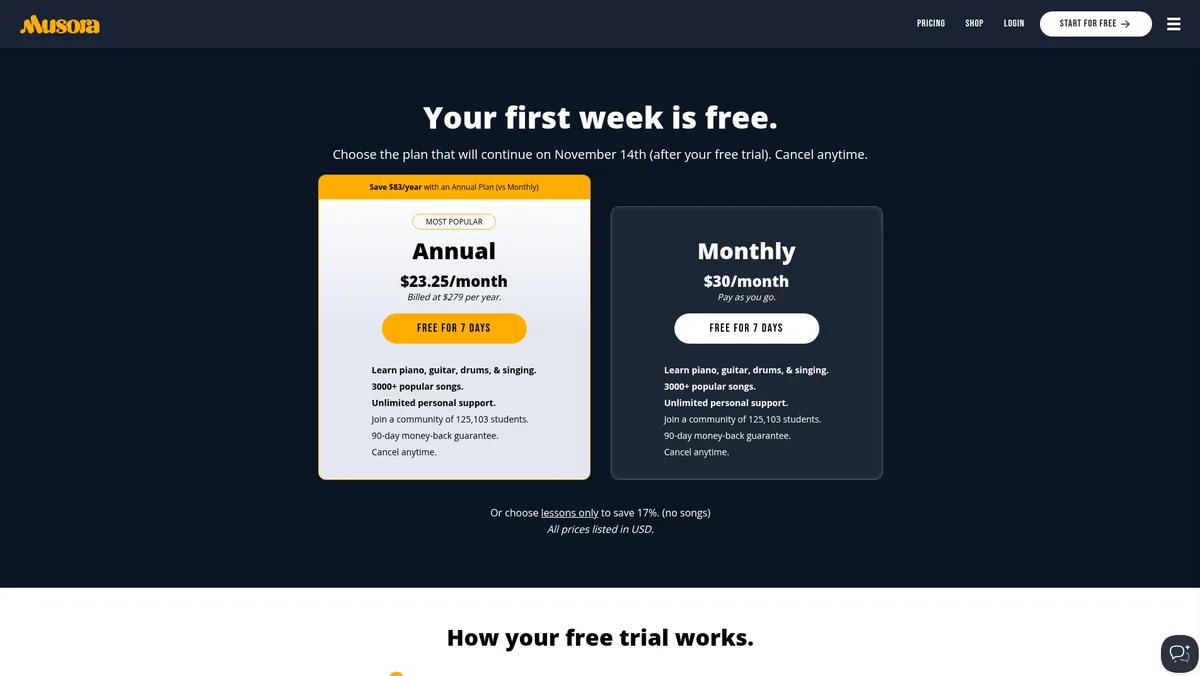
No sale price was listed at our latest price check. A current offer adds the Easy Chords course free when you start a Musora trial, and a sign-up list for Black Friday deals is open.
In the App Store, the membership is listed at $279.00 a year or $29.99 a month. Web memberships can be paused for one to three months, which app store subscriptions cannot.
Trial, renewal and refunds
Every plan starts with a 7 day free trial, and the plan you pick is charged on day 7 unless you cancel first. Musora sends a reminder before the charge, and you cancel under Profile, Membership and Purchases.
First-time monthly or yearly members can get a full refund within 90 days of the first payment. On the web, you cancel and then email support; renewals are not covered.
If you joined in the iPhone or Android app, Apple or Google handles the refund. If a promotion included gear, you can keep it with its retail value deducted, or return it unopened.
Free trial checklist
A week is enough to tell whether a teacher on video suits you. Use it to test the parts you would really pay for.
- Follow the first Method sessions on the device you will really use, and check the screen is easy to see from the bench.
- Email the mentor team with your goals and see how useful the reply and practice plan are.
- Join or watch a live lesson or Q&A and ask one question.
- If you are on the plan with songs, try a tutorial at slow tempo with loops, then decide whether songs are worth the extra cost.
- Cancel under Profile, Membership and Purchases before day 7 if it is not for you, or in the App Store or Google Play if you joined there.
How it compares
| Option | Best for | Format | Feedback on your playing | Price model |
|---|---|---|---|---|
| Pianote | Adults who want a teacher explaining each step, with feedback from people | Follow-along teacher videos, mentors, weekly live Q&As | Human: mentors and live Q&As | Subscription, 7 day trial |
| Flowkey | Song-first learners who want instant note checks and a free account | App with video of a pianist’s hands and sheet music | Automatic: mic or MIDI note recognition | Free account, subscription |
| Pianoforall | Self-starters who want to pay once | Chord-first course | Self-checked | $49 one time |
| Playground Sessions | A structured course with automatic feedback in a Windows or Mac app | Bootcamp with video teachers | Automatic in the app | Subscription, 7 day trial |
Flowkey
Flowkey listens through a microphone or MIDI and waits for the right notes, and it has a free account. Choose it if instant note feedback matters more to you than a teacher’s explanation.
Pianoforall
Pianoforall is a chord-first course for a single $49 payment. It suits self-starters on a budget, while Pianote adds mentors, live Q&As and a library that keeps growing.
Piano In 21 Days
Piano In 21 Days is another teacher-led video course with a short, fixed plan. Compare it with Pianote if you prefer one set course over an open-ended membership.
When to choose an alternative
- Choose Flowkey over Pianote if you want an app that checks every note, with a free account to start.
- Choose Pianoforall over Pianote if you want to pay once.
- Choose Piano In 21 Days over Pianote if you want one fixed course to finish.
- Choose Playground Sessions over Pianote if you want automatic feedback on your playing in a Windows or Mac app.
Who should skip it
- Note-by-note feedback seekers: Pianote’s feedback comes from people, not from an app scoring each note.
- One-payment buyers: the membership is a subscription.
- Young solo learners: members must be 16 or older, and younger children need a parent alongside.
FAQs
Is Pianote worth it?
Pianote is worth it if you learn best from a teacher on video and want mentors and live Q&As to keep you on track. The yearly plan with songs costs $279, and the 90 day money back guarantee lowers the risk for first-time members. If you want an app that scores every note, look at Flowkey instead.
How much does Pianote cost?
Pianote is part of a Musora membership. The plan with songs costs $30 a month or $279 a year, and the lessons-only plan costs $25 a month or $229 a year, in US dollars.
Does Pianote have a free trial?
Yes. Every plan starts with a 7 day free trial, and billing begins on day 7 unless you cancel first. Musora sends a reminder before the charge.
What is Pianote’s refund policy?
First-time monthly or yearly members can get a refund within 90 days of their first payment. The guarantee covers the initial payment only, not renewals. Memberships bought in the App Store or Google Play are refunded by Apple or Google.
Does Pianote give feedback on my playing?
Yes, from people. Musora Mentors offer personalized lesson plans and constructive feedback, and Musora’s Student Review service has a mentor reply to a video of your playing by video, in writing or on a quick call. Confirm that your chosen plan includes Student Reviews before subscribing; weekly live lessons let you ask questions, and Musora VIP, a paid add-on, adds weekly small-group feedback sessions.
Do I need MIDI to use Pianote?
No. Pianote lessons need no MIDI, cables or extra software. A keyboard with at least 61 keys or an acoustic piano is enough to start.
Can I use Pianote on a computer?
Yes. Pianote runs in a web browser, with Chrome the most compatible, and in the Musora app for iPhone, iPad and Android. The app can also play lessons offline.
What is the difference between the plan with songs and lessons only?
Both plans include the Method, courses, mentors and live lessons for every Musora instrument. Only the plan with songs adds the licensed song library with transcriptions and practice tools.
Is Pianote good for kids?
Members must be at least 16, and under 18s need a parent or guardian’s consent. Younger children can follow the lessons with a parent nearby, since the teachers are not live in the room.
Pianote or Flowkey: which is better?
Pianote is better if you want a teacher explaining each step and human support. Flowkey is better if you want an app that listens and checks your notes, and it has a free account.
Start the 7 day trial, follow the first Method sessions and send the mentors your goals. If a teacher on screen keeps you practicing, the yearly plan is the better value. Our full guide to the best online piano lessons covers every other option.