Playground Sessions is worth it for beginners age 7 and up who want a structured, song based path into reading real notation, with feedback as they play. The catch is that it is a downloaded app rather than a website, and its scoring is most accurate with a USB or MIDI cable. We score it 4.5/5: start the 7 day free trial, then pick Annual at a regular $149.99 for the first year and $12.49 a month from month 13, rather than Lifetime, which keeps copyrighted songs unlimited for only 2 years.
Playground Sessions is a structured piano course: a three level Bootcamp, a shelf of focused Courses and more than 2,000 songs, with feedback and scoring as you play through a cable or your device microphone.
For beginners age 7 and up looking at the best online piano lessons, it is one of the most structured routes into reading real notation with songs you know. Feedback works through a USB or MIDI cable or through your device microphone on an acoustic piano, with a cable giving the most accurate real-time scoring.
4.5/5
- 2,000+songs
- 7+starting age
- 3Bootcamp levels
- 6supporting courses
- 7-dayfree trial
- 4platforms
Playground Sessions is a structured Bootcamp path for beginners age 7 and up who want to read real notation with songs they already know. Feedback and scoring work through a USB or MIDI cable or through your device microphone on an acoustic piano, and a cable remains the setup for the most accurate real-time scoring.
- Best for
Beginners who want a set lesson order and real notation
- Less suited
Browser-only practice and chord-only learners
- Keyboard
Acoustic piano via the device mic, or a USB/MIDI keyboard (cable recommended for the most accurate real-time scoring)
- Trial
7 day free trial on single memberships
- Current sale
Monthly $19.99
$24.99; Annual $74.99 first year$149.99; Lifetime $174.99 once$349.99
Who it’s for
The lessons assume you have never touched a piano, the recommended starting age is 7, and the path carries you well into intermediate territory.
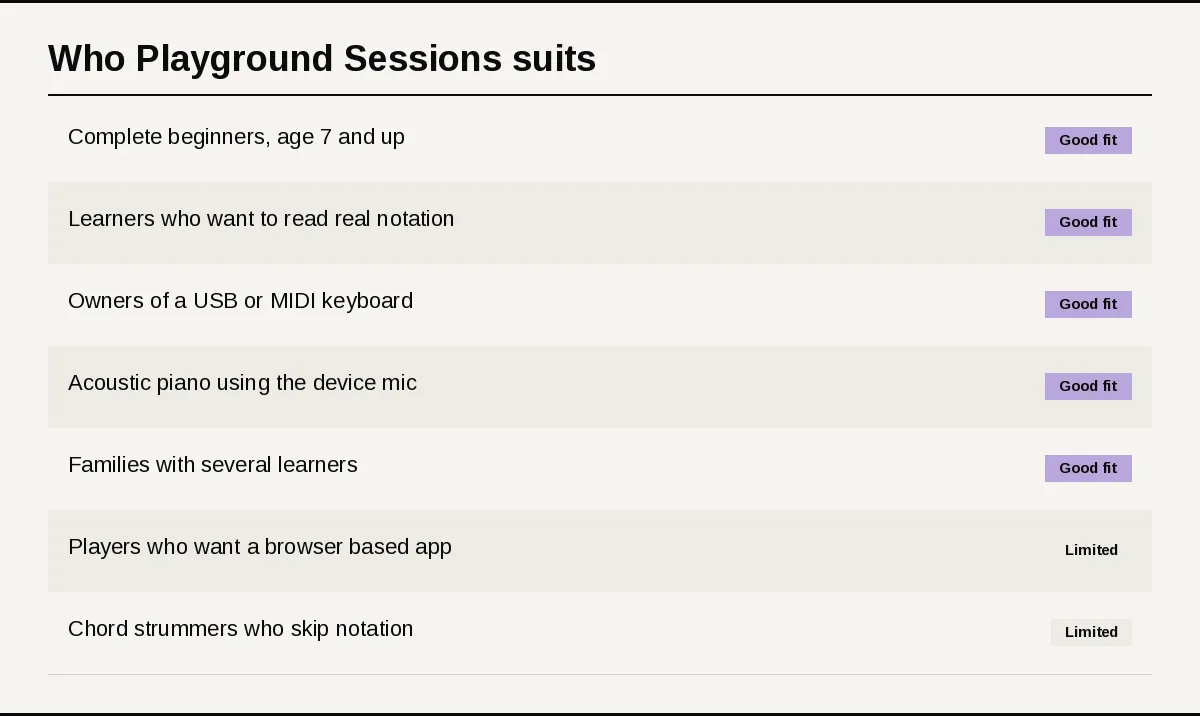
A good fit if you
- Are starting from zero and want a set order of lessons rather than a menu of songs.
- Want to learn to read real notation alongside songs you know.
- Own, or plan to buy, a keyboard with a USB port or MIDI IN and OUT ports.
- Want to share learning across a household, since family plans are sold alongside single memberships.
- Have an acoustic piano and are happy to use your device microphone for feedback and scoring.
A limited fit if you
- Want to practice in a web browser rather than a downloaded app.
- Mainly want to strum chords for pop songs and skip reading music.
What sets it apart
Three things set Playground Sessions apart from Simply Piano and flowkey.
A sequenced Bootcamp
The spine of the app is the Bootcamp, three levels (Rookie, Intermediate and Advanced) laid out in strict order. Every lesson is built around a popular song, so the theory arrives with a tune attached.
Named musicians behind the method
The late Quincy Jones co-founded Playground Sessions and contributed to the original methodology, curriculum and arrangements.
Curriculum development was led by musician and professor Alex Ness, with pianist David Gracia and musicologist Dr. Byron Adams among the originators.
Video teachers include YouTube pianist David Sides, Phil Anderson, award winning classical pianist Wi Chen and Theron Brown, whose playing draws on gospel, jazz and soul.
A large licensed song library
The catalog runs past 2,000 songs and keeps growing, from pop and rock to classical, jazz, R&B, TV themes and show tunes. Popular artists sit next to the great composers.
How we evaluated Playground Sessions
We reviewed Playground Sessions’ curriculum, course structure and teachers. We also checked pricing, trial and refund terms and the feedback it gives.
We compared it on the four factors in how we score lesson platforms. For setup and ease of use, we assessed device support, keyboard requirements and how the app is laid out around Bootcamp, Courses and Songs. For quality of lessons and teachers, we looked at the Bootcamp sequence, the song based lesson design and the musicians who teach and shaped the curriculum.
For range of content, we compared three Bootcamp levels, the named Courses and a song library of over 2,000 titles. For useful features, we weighed color coded note feedback, looping, tempo control, demo mode, backing tracks and the progress dashboard.
We found that Playground Sessions is strongest for beginners who want structure and notation, and that its keyboard requirements are the main thing to check before paying. Commissions do not influence which products appear here or how they rank.
Our scores
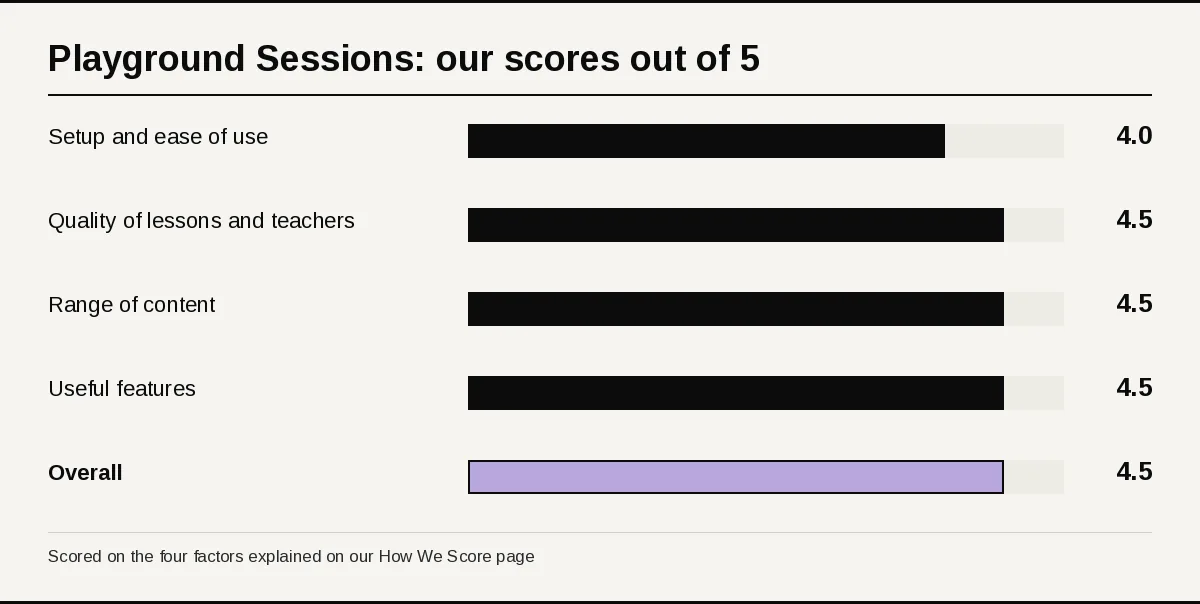
- Setup and ease of use: 4/5. Apps cover iPad, iPhone, Android, Windows and Mac. Feedback works through a USB or MIDI cable or the device microphone, a cable gives the most accurate real-time scoring, and Bluetooth MIDI is not officially supported.
- Quality of lessons and teachers: 4.5/5. Song based Bootcamp lessons follow a set order, with video from named pianists and a curriculum led by a music professor.
- Range of content: 4.5/5. Three Bootcamp levels, Courses from 50 Easy Melodies to Hanon Exercises, and over 2,000 songs.
- Useful features: 4.5/5. Green, red and pink note feedback, looping, tempo control, demo mode, a click track, backing bands and a dashboard of accuracy and practice time.
- Overall: 4.5/5.
The overall score is the average of the four factor scores, rounded to the nearest half point. Here the average of 4, 4.5, 4.5 and 4.5 is 4.375, which rounds to 4.5.
What you need to use Playground Sessions
Three checks decide how much of Playground Sessions you can actually use: your device, the ports on your keyboard and how many keys it has. Get them right before the trial clock starts.
Supported devices
- iPad and iPhone: iPadOS or iOS 15.1 or later, with 16 or later recommended.
- Android phones and tablets: Android 11 or later with at least 4 GB of RAM.
- Windows PC: Windows 10 or 11, a USB port and a screen of at least 1200 by 800.
- Mac: macOS 11 or later, a USB port and a screen of at least 1200 by 800.
Playground Sessions is a downloaded app, not a website you play in. On Windows and Mac, the minimum setup also includes a reasonable internet connection, around 1 Mbps.
Keyboard and connection
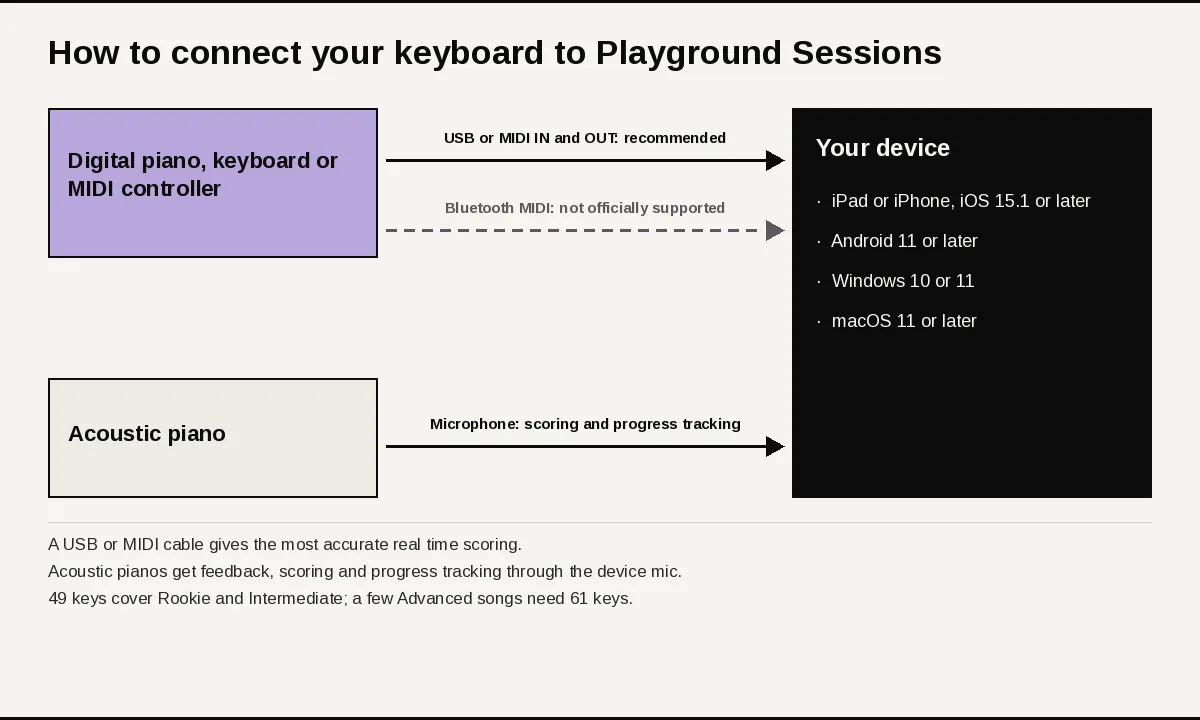
For the most accurate real-time scoring, use a keyboard, MIDI controller or digital piano with a USB port, or two MIDI ports labeled MIDI IN and MIDI OUT. Those ports send your notes straight to the app.
A wired USB or MIDI cable is the recommended connection for digital keyboards. Bluetooth MIDI is not officially supported.
Keyboard size
A 49 key keyboard covers all Rookie and Intermediate songs and lessons. Many Advanced songs also fit on 49 keys, but a few need 61 keys, so 61 or more is the safer buy if you plan to go far.
Acoustic pianos
Acoustic pianos work through your device microphone. The app listens as you play and still gives accuracy scoring and progress tracking, with no cable needed.
Mic feedback is more sensitive to room noise and backing tracks, and scores arrive after a section rather than note by note. A USB or MIDI cable on a digital keyboard remains the setup for the most accurate real-time scoring.
Getting started and the dashboard
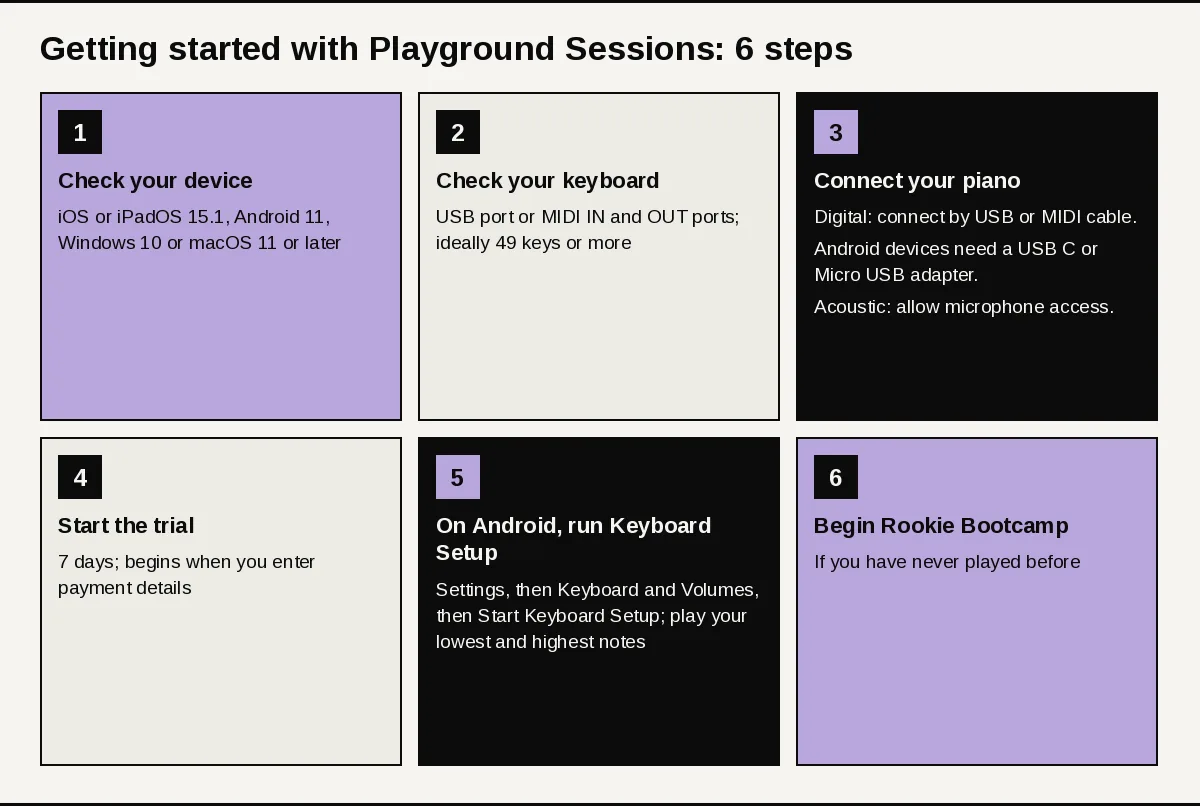
Take these six steps in order so the app can hear your keyboard from the first lesson.
First session checklist
- Confirm your device meets the minimum: iOS or iPadOS 15.1, Android 11, Windows 10 or macOS 11.
- Confirm your keyboard has a USB port or MIDI IN and OUT ports, and ideally 49 keys or more.
- For a digital keyboard, connect it with a USB or MIDI cable (Android devices need a USB C or Micro USB adapter). For an acoustic piano, allow microphone access so the app can listen.
- Create an account and start the 7 day trial, which begins when you enter payment details.
- On Android, open Settings, then Keyboard and Volumes, and run Start Keyboard Setup, playing your lowest and highest notes when asked.
- Start with the Rookie Bootcamp if you have never played before.
How the app is organized
The app has three main parts: Bootcamp, Courses and Songs. Bootcamp teaches the fundamentals in order, Courses go deeper on specific skills, and Songs is the open library.
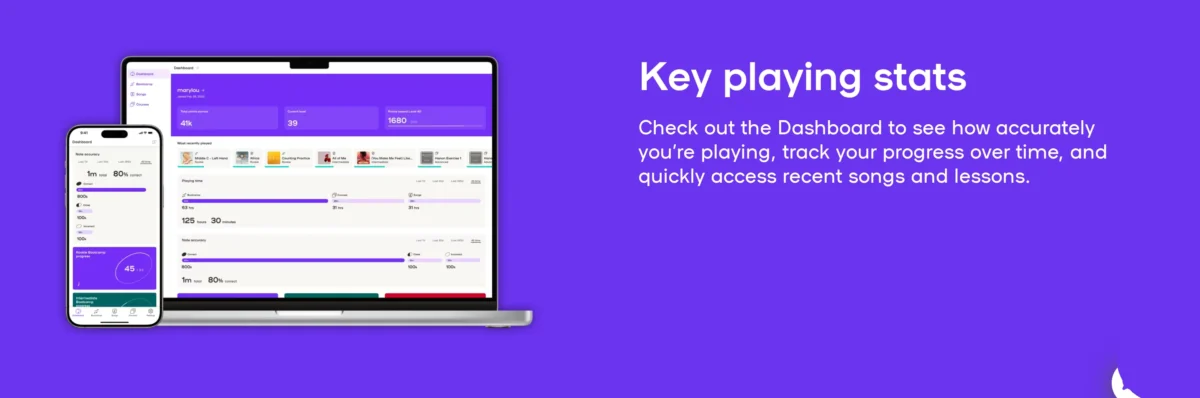
The Dashboard shows how accurately you are playing, how your accuracy changes over time and where your practice time goes. It also links straight to your recent songs and lessons.
Teachers and private instructors can request classroom setup through a separate Teachers Program.
Curriculum deep dive
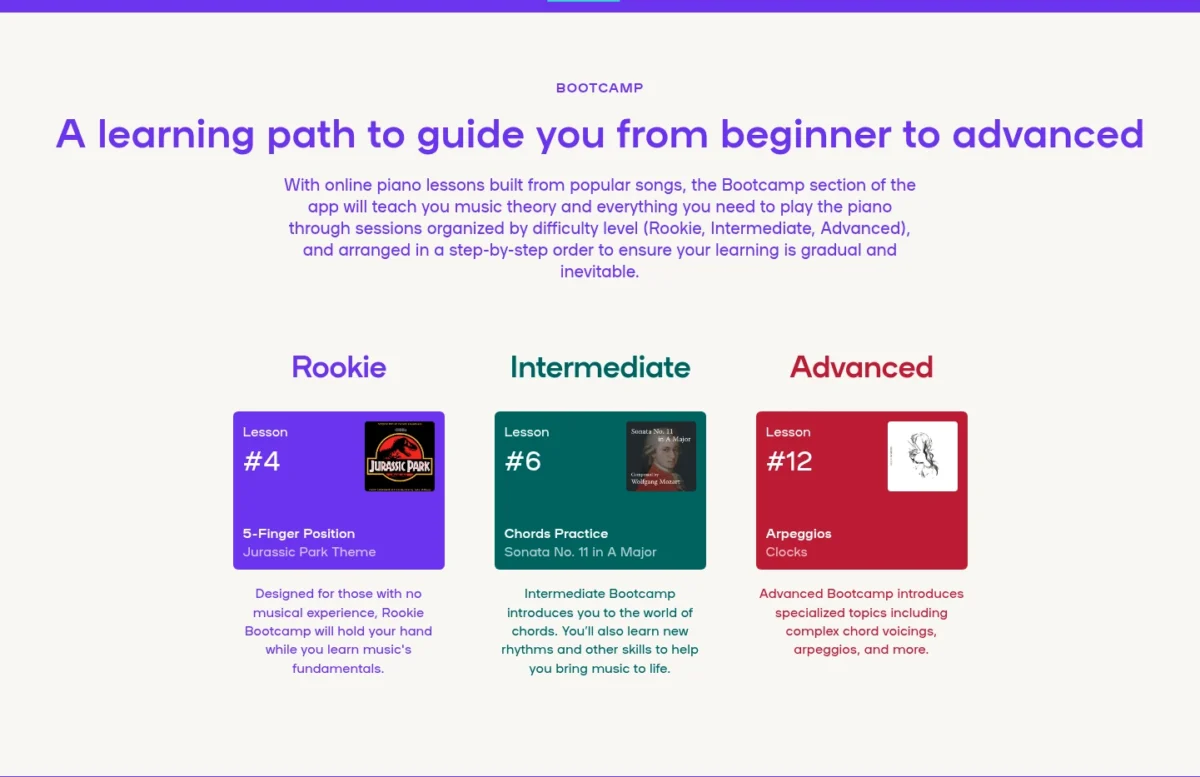
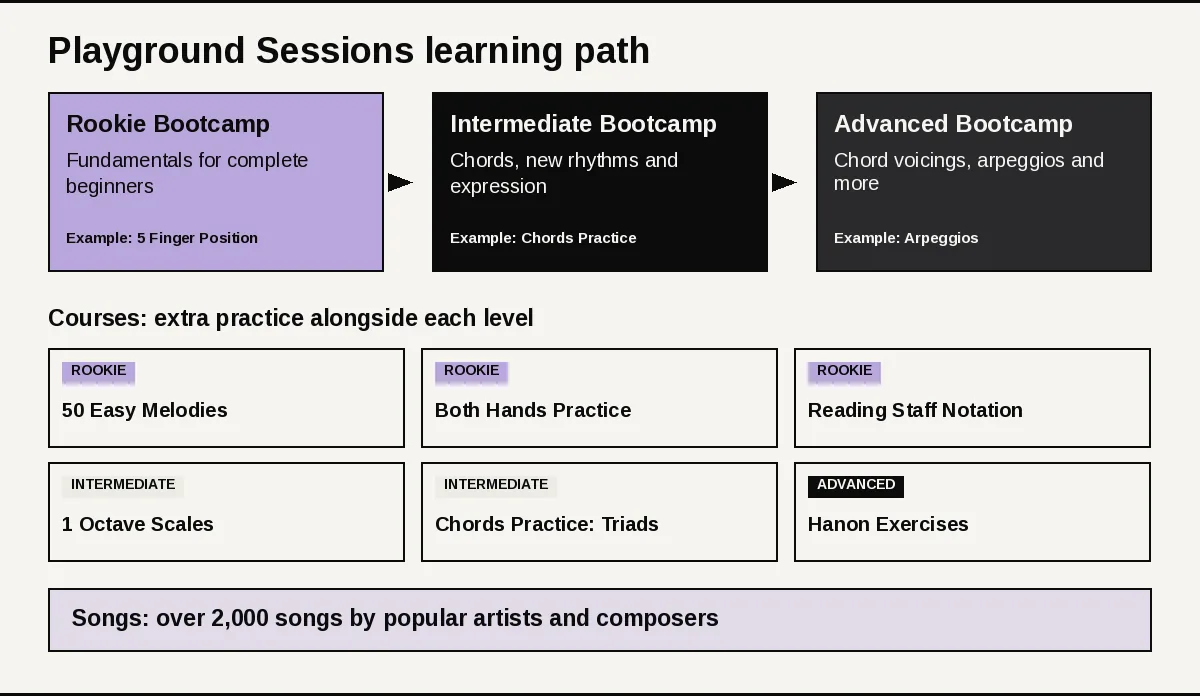
The learning path runs from first notes to advanced technique, one step at a time.
Rookie Bootcamp
Rookie is designed for people with no musical experience. It starts with naming the keys and basic rhythm and harmony, then moves on to reading music.
Rookie lesson 4, 5 Finger Position, is taught through the Jurassic Park Theme.
Intermediate Bootcamp
Intermediate brings in left hand chords and new rhythms, and lesson 6, Chords Practice, leans on Sonata No. 11 in A Major.
Advanced Bootcamp
Advanced moves into richer harmony, with complex chord voicings and arpeggios. Lesson 12, Arpeggios, is built around Clocks.
A few Advanced songs need a 61 key keyboard, so check your instrument before you get this far.
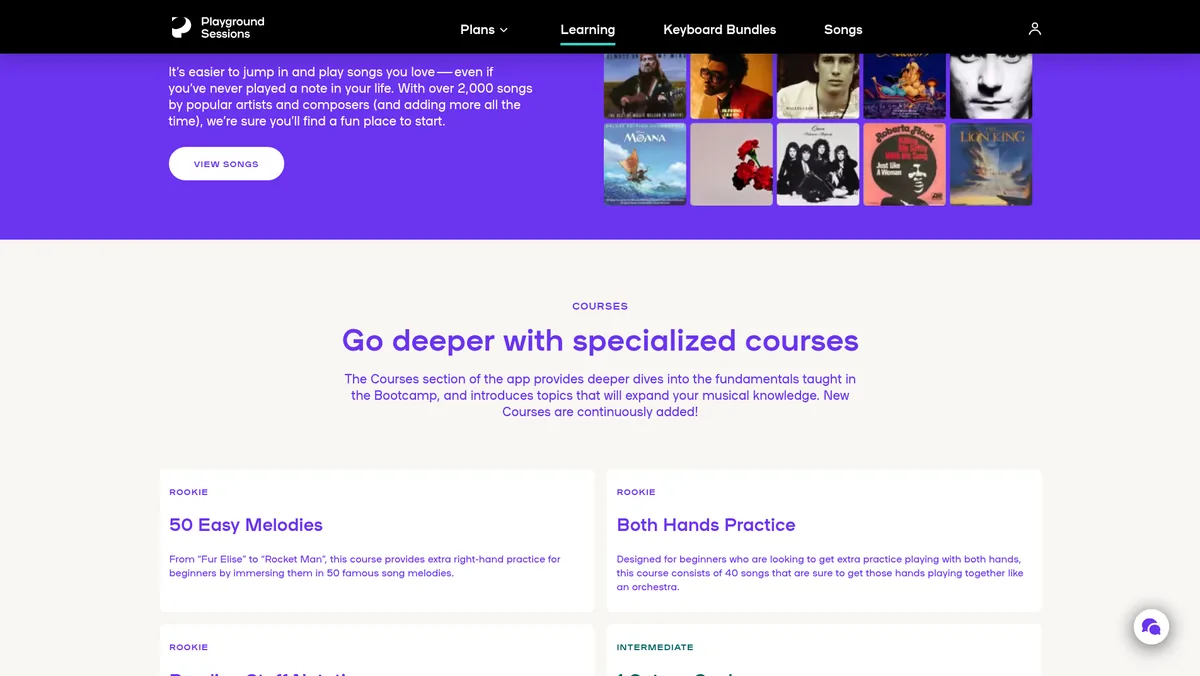
Courses
Courses are focused, level tagged extras for when a skill needs more practice. They include:
- 50 Easy Melodies (Rookie): right hand practice across 50 famous melodies, from Fur Elise to Rocket Man.
- Both Hands Practice (Rookie): 40 songs for getting both hands to play together.
- Reading Staff Notation (Rookie): extra practice from lines and spaces up to the Grand Staff.
- 1 Octave Scales (Intermediate): all major and natural minor scales, both hands, within one octave.
- Chords Practice: Triads (Intermediate): major and minor chords and the transitions between them, ordered from 0 to 4 accidentals.
- Hanon Exercises (Advanced): the first 20 exercises from Hanon’s The Virtuoso Pianist, for dexterity and finger independence.
New Courses are added over time.
Songs and practice tools
The song library
More than 2,000 songs fill the library, arranged from beginner to advanced. Membership unlocks all of them, with one catch for lifetime plans covered in the pricing section below.
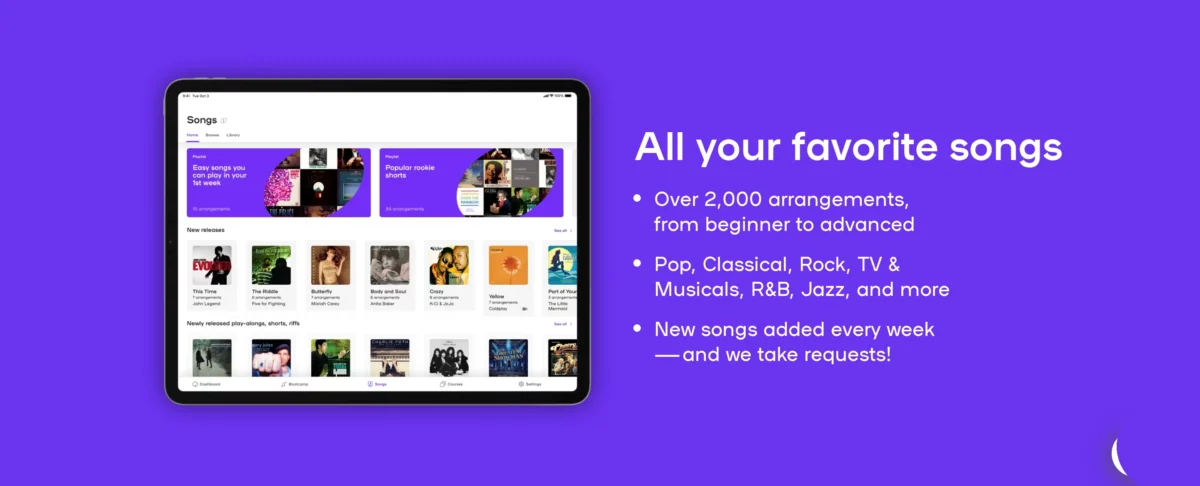
David Sides brings his own arrangements of “Apologize,” “Halo,” “In The End” and “Hello.” Public domain classics and traditional tunes share the shelf with licensed pop.
Three arrangements per song
Every song comes in three sizes. Rookie versions pair a single note right hand melody with single bass notes in the left.
Intermediate versions keep a single note melody but give the left hand chords. Advanced versions add multi note melodies and more complex left hand harmony.
How song practice works
Lessons split into segments, songs can be practiced section by section, and the loop tool repeats the measures you pick until they are clean.
Tempo has three presets, Normal, Slow and Very Slow, plus a custom setting. The piano demo can play the left hand, the right hand or both, so you can hear each part before you try it.
You can also toggle a metronome, a count in, the backing track, finger numbers and note names. Each control has its own volume or on and off switch.
Does Playground Sessions actually correct your playing?
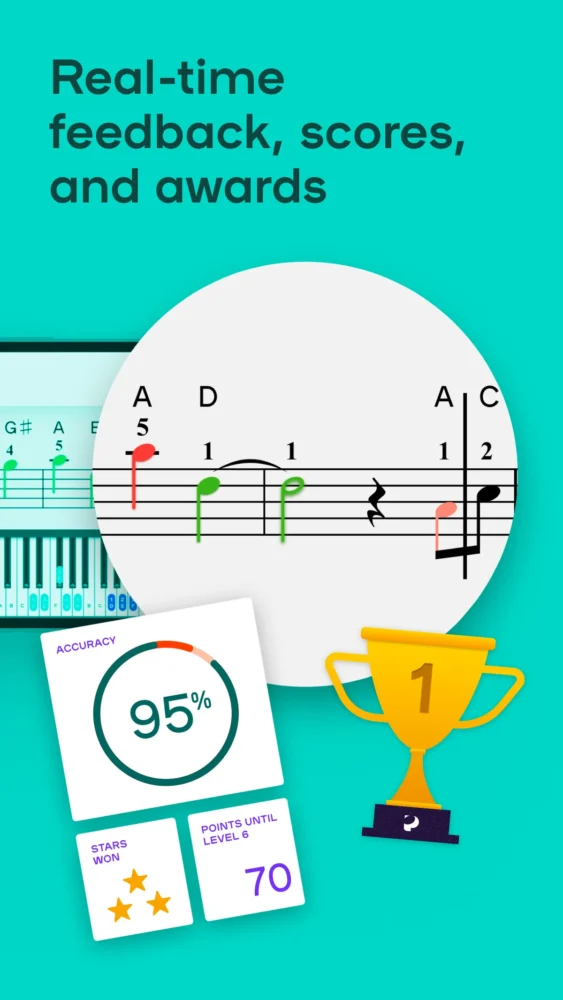
It corrects your notes and your timing. With a USB or MIDI cable, a correct note turns green, a wrong note turns red and a mistimed note turns pink, and each piece ends with an accuracy score. On an acoustic piano the app listens through your device microphone and still scores your accuracy, with scores arriving after a section rather than note by note.
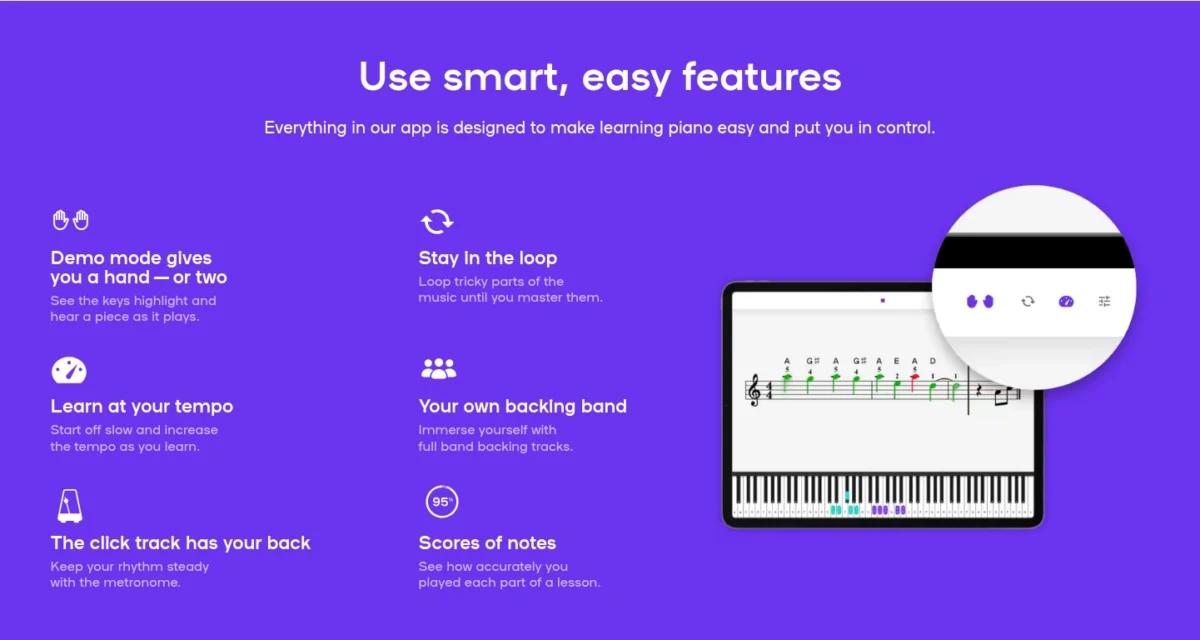
Feedback and progress
- Real time feedback: a correct note turns green, a wrong note turns red and a mistimed note turns pink.
- Scores and awards: an accuracy score at the end of each piece, plus awards that mark progress.
- Dashboard: accuracy over time, practice time and quick access to recent material.
That scoring is automatic. Check dynamics, hand position, finger technique and posture yourself or with a teacher, and record yourself now and then to hear your phrasing.
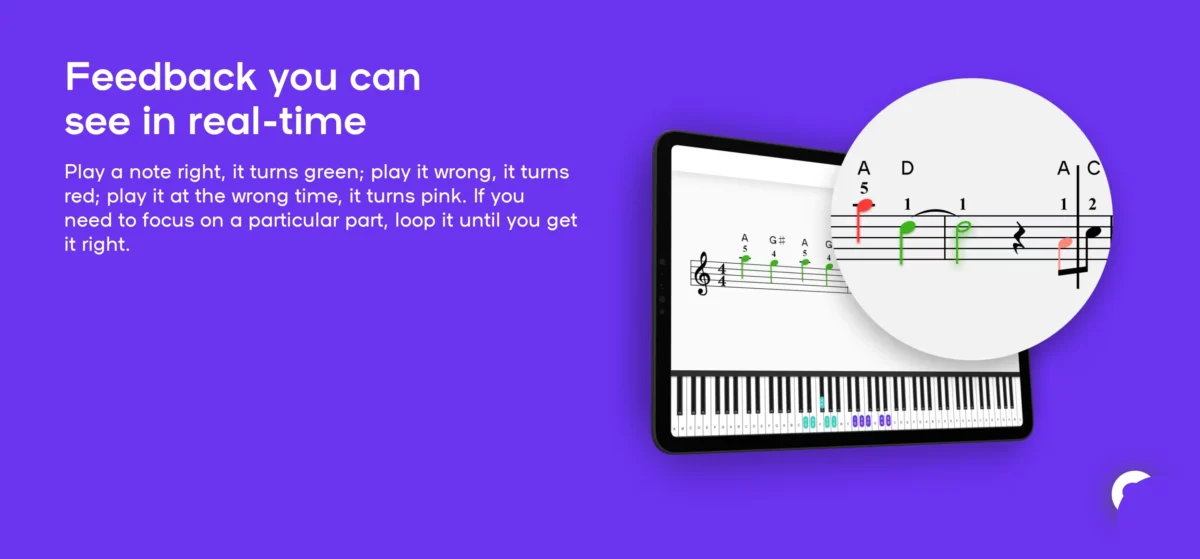
Practice controls
- Demo mode: highlighted keys and audio playback before you try a part.
- Loop: repeat any section until it is clean.
- Tempo control: start slow and raise the speed as you improve.
- Click track: a built in metronome to keep time.
- Backing band: full band or orchestral backing tracks.
- Sheet music printing: free for public domain pieces, paid for copyrighted songs.
Automatic, recorded or live?
- Automatic feedback: the app scores your notes and timing as you play.
- Recorded video lessons: named pianists such as David Sides teach on video, showing you how to play a part rather than reviewing your playing.
- Teacher review or live lessons: if you want someone to watch you play, arrange that with a local or online teacher alongside the app.
Our recommendation: use a USB or MIDI cable for the most accurate real-time scoring, and slow the tempo and loop short sections until the notes stay green. Turn on the click track to steady your rhythm, and record yourself once a week. Add an occasional lesson with a teacher if you want help with expression and technique.
Pros and cons
Where it’s strong
- A three level Bootcamp in a set order, from naming keys to arpeggios
- Named Courses such as Both Hands Practice, 1 Octave Scales and Hanon Exercises
- Over 2,000 songs with backing bands, looping and tempo control
- Color coded feedback on pitch and timing plus a progress dashboard
- Apps for iPad, iPhone, Android, Windows and Mac
- A 30 day money back guarantee on the first membership
Where it falls short
- Mic feedback is less immediate than a USB or MIDI cable, and Bluetooth MIDI is not officially supported
- Lifetime plans include copyrighted songs for only 2 years
- Renewals are not refundable
- Copyrighted sheet music costs extra to print
- A few Advanced songs need a 61 key keyboard
Price, trial and refund
Regular US prices are listed first, with the current sale prices next to them. Sale prices change, so check the checkout page before you pay.
| Plan | Regular US price | Current sale | Includes | Trial | Refund |
|---|---|---|---|---|---|
| Monthly | $24.99 a month | Sale: $19.99 a month | Bootcamp, Courses, unlimited songs | 7 days | 30 days on first purchase |
| Annual | $149.99 first year, then $12.49 a month | Sale: $74.99 for the first year (regularly $149.99) | Bootcamp, Courses, unlimited songs | 7 days | 30 days on first purchase |
| Lifetime | $349.99 once | Sale: $174.99 once (regularly $349.99) | Lifetime lessons and public domain songs; copyrighted songs for 2 years | 7 days | 30 days on first purchase |
At regular prices, the annual plan bills $149.99 up front for year one, then renews at $12.49 a month from month 13. On the current sale, year one is $74.99. Monthly plans renew every month, and renewals are not refundable.
The lifetime plan’s song limit
Lifetime members keep Bootcamp, Courses and public domain and original songs for life. Unlimited access to copyrighted songs lasts 2 years. After that, current offer terms list continued unlimited song access at $3.33 a month, or individual songs at $0.99 each.
Those post year 2 charges can change, so check the current offer before you buy a lifetime plan for pop songs.
Trial and refund
The free trial lasts 7 days and starts when you enter payment details. A 30 day money back guarantee covers your first membership purchase only; purchased songs and keyboard bundle hardware are excluded.
How to judge it during the free trial
Use the trial week to check your setup and the scoring before the first charge.
- Record the same short piece on day 1 and day 6 with your usual MIDI or mic setup.
- Finish Keyboard Setup and the first Rookie Bootcamp lessons, and note whether color feedback matches what you play.
- Open at least three songs you know and check arrangement difficulty and scoring.
- If you use an acoustic piano, test mic mode; if you have a USB or MIDI cable, prefer that for scoring accuracy.
- Cancel before the trial ends if you do not want the plan to start, and keep the first-purchase refund window in mind if you continue.
How it compares
| App | Best for | Regular monthly price (US) | Free option | Devices | Keyboard connection |
|---|---|---|---|---|---|
| Playground Sessions | Beginners age 7 and up who want a song based path into notation | $24.99 | 7 days | iOS, Android, Windows, Mac | USB or MIDI cable recommended; device mic for acoustic |
| Simply Piano | A lighter, phone first start | Varies by country and platform | 7 days, yearly plans | iOS, Android, Chromebook | MIDI cable, or Bluetooth MIDI on iPhone and iPad |
| flowkey | Learning songs from video of a pianist’s hands, including in a browser | $24.99 Premium | 7 days, yearly plans | iOS, Android, web browser | Microphone or MIDI; Bluetooth MIDI on iOS |
| Piano Marvel | Sight reading and technique practice | $17.99 | Free account | Windows, Mac, iPad, iPhone | MIDI recommended; Book Mode for acoustic |
Simply Piano
Simply Piano runs on iOS, Android and Chromebook, with no desktop version. Prices vary by country and platform, and its 7 day trial comes with yearly plans.
It suits learners who want a lighter, phone first start. Our Playground Sessions vs Simply Piano breakdown sets the two side by side.
Flowkey
flowkey runs on iOS, Android and in a web browser, and it can listen through your device microphone or connect by MIDI. Premium costs $24.99 a month or $149.99 a year at US prices, with a cheaper Classic tier for classical and public domain pieces.
It suits players who want to learn songs from video of a pianist’s hands. The flowkey and Playground Sessions comparison goes deeper.
Piano Marvel
Piano Marvel runs in Chrome on Windows, Mac and ChromeOS and as an app on iPhone and iPad, with a free account and Premium at $17.99 a month or $129.99 a year. Its scoring is most accurate with a USB or MIDI keyboard, and microphone scoring works on iPhone and iPad.
It leans toward sight reading and technique. See how Playground Sessions stacks up against Piano Marvel, or browse our guide to the best online piano lessons for every option. Players who want chords first and no subscription can start with our Pianoforall review.
When to choose an alternative
- Choose flowkey over Playground Sessions if you want to practice in a web browser or lean on video led song learning with mic or MIDI input.
- Choose Simply Piano over Playground Sessions if you want a lighter phone first start and are fine with a simpler path than a full Bootcamp.
- Choose Piano Marvel over Playground Sessions if sight reading drills and technique practice matter more than a song heavy Bootcamp.
- Choose Pianote over Playground Sessions if you want teacher led video lessons and a broader method library rather than a cable or mic scored Bootcamp.
Who should skip it
- Browser learners: Playground Sessions is a downloaded app, so anyone who wants to practice in a web browser should look at flowkey instead.
- Chord strummers: if you only want to accompany yourself on pop chords, the focus on reading notation is more than you need.
FAQs
How much does Playground Sessions cost?
At regular US prices, Monthly is $24.99 a month, Annual is $149.99 for the first year and then $12.49 a month, and Lifetime is $349.99 once. On the current sale, Monthly is $19.99 a month, Annual is $74.99 for the first year (regularly $149.99), and Lifetime is $174.99 once (regularly $349.99).
Is there a free trial?
Yes. Single memberships come with a 7 day free trial that begins when you enter payment details.
What is the refund policy?
A 30 day money back guarantee covers your first membership purchase. Renewals, purchased songs and keyboard bundle hardware are not refundable.
What size keyboard do I need, 49 or 61 keys?
A 49 key keyboard handles every Rookie and Intermediate song and lesson and many Advanced songs. A few Advanced songs need 61 keys, so choose 61 or more if you plan to reach that level.
Do I need a MIDI keyboard?
Not always. Acoustic pianos can use your device microphone for feedback, scoring and progress tracking. For the most accurate real-time scoring on a digital keyboard, use a USB port or MIDI IN and OUT ports, and prefer a wired cable over Bluetooth.
What does the Bootcamp include?
Three levels, Rookie, Intermediate and Advanced, each made of song based lessons in a set order. Topics run from naming the keys and reading music to chords, arpeggios and chord voicings.
What happens to songs on a lifetime plan after year 2?
Bootcamp, Courses and public domain songs stay included for life. Unlimited copyrighted song access ends after 2 years. Current offer terms list continued unlimited access at $3.33 a month, or individual songs at $0.99 each.
Can I print sheet music?
Yes. Public domain classical and traditional songs print free, and copyrighted songs cost extra to print.
Are there family plans?
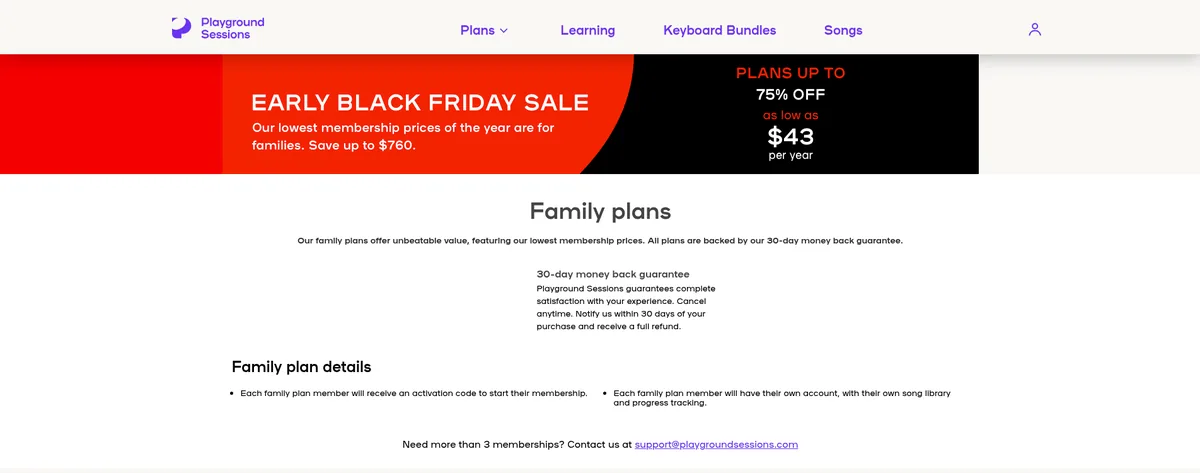
Yes. Playground Sessions sells family plans that cover several learners in one household, alongside single memberships.
What are the best alternatives to Playground Sessions?
Simply Piano suits a lighter phone first start, flowkey suits learning songs from video, and Piano Marvel suits sight reading and technique practice.
Playground Sessions gives beginners a clear, song driven path with feedback on every note. Use the 7 day trial to confirm the app hears your keyboard, then pick a plan.