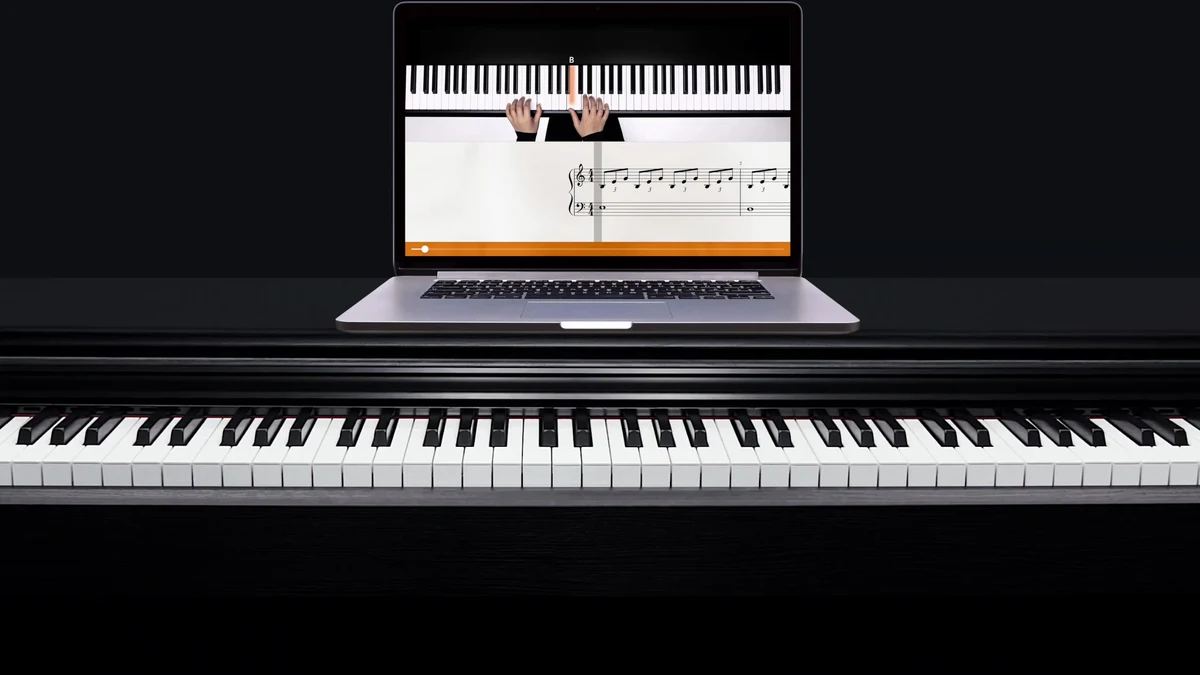
Flowkey teaches piano the way many people first try to learn it: watch a pianist’s hands, read along, and copy one passage at a time. A video of the hands sits above the sheet music, and the app listens through your microphone or a MIDI cable and waits for the right notes before it moves on.
For song-first beginners and returners, it sits at the top of our ranked guide to online piano lessons. The Berlin company launched it in 2014, and a free account lets you try a few songs and course lessons before you choose the Classic or Premium plan.
4.5/5

- 1,000+classical and public domain songs
- 8sight reading lessons
- 21ABRSM exam pieces
- 5family profiles
- 7-daytrial on yearly plans
- 14-daymoney back guarantee
Flowkey shows a pianist’s hands above the sheet music and listens as you play any piano, by microphone or MIDI, in a browser or on a phone or tablet. It suits song-first beginners and returners, though pop and film songs need the Premium plan.
- Best for
Beginners and returners who want to learn real songs by watching and reading along
- Less suited
Pop fans who only want the cheaper Classic plan
- Keyboard
Any piano via the microphone, or a USB or MIDI cable; Bluetooth MIDI on iPhone and iPad
- Trial
Free account, plus a 7 day Premium trial on yearly plans
- Price
Classic $16.49 a month or $99.99 a year; Premium $24.99 a month or $149.99 a year; US prices; prices vary by country
Who it’s for
This is an app for people who learn by watching and copying. It suits complete beginners and players coming back to the piano, and it works on a phone, a tablet or a computer browser.
A good fit if you
- Want to learn songs you know, from classical pieces to pop and film music.
- Like seeing a pianist’s hands and the sheet music on the same screen.
- Practice on an acoustic piano, a digital piano or a keyboard, with or without a MIDI port.
- Want to switch between a laptop browser, a tablet and a phone with one account.
- Are working toward an ABRSM exam and want to practice some of the set pieces with feedback.
A limited fit if you
- Want pop, rock or film songs but only want to pay for the cheaper Classic plan, which covers classical and public domain music.
- Plan to learn on an Amazon Fire tablet, which Flowkey does not support.
What sets it apart
Most piano apps lean on a game screen or a scrolling score. Three things make Flowkey feel different from the first lesson.
Video and sheet music together
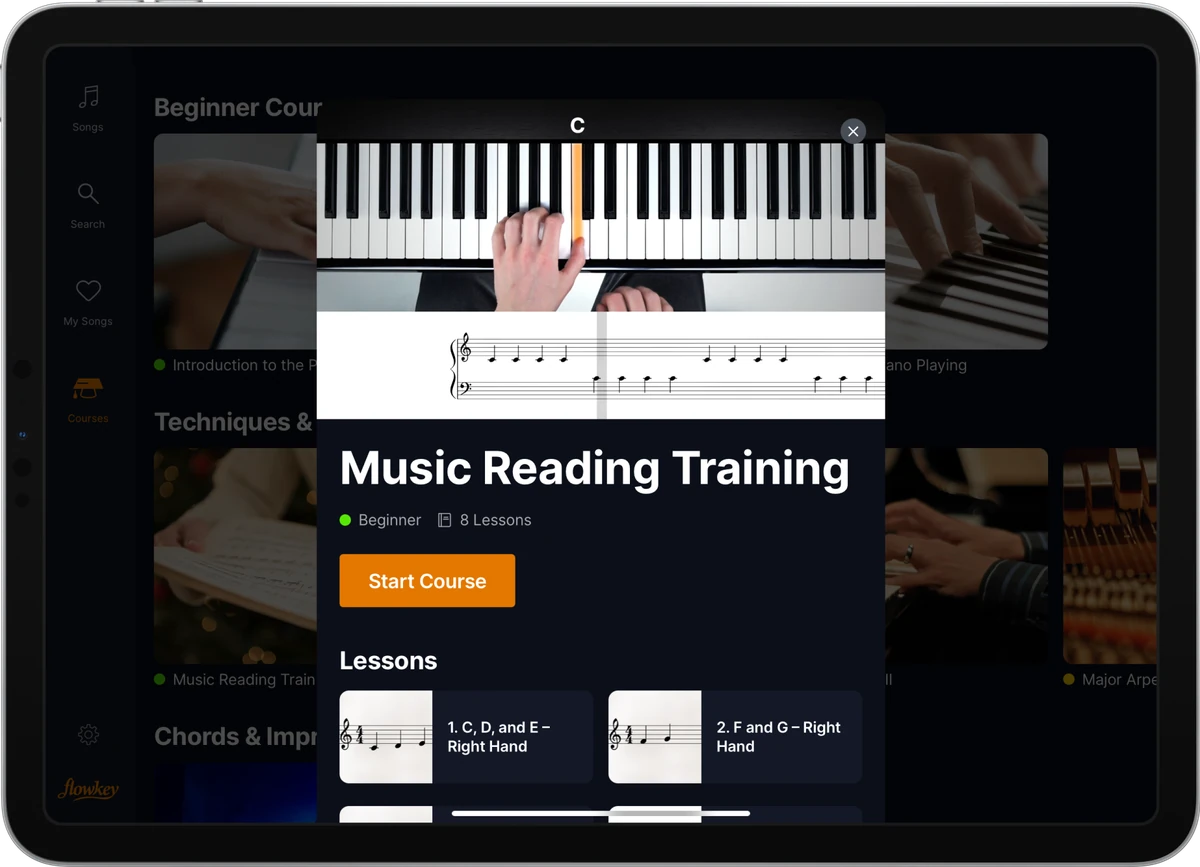
Each song plays as a video of a pianist’s hands on the keys, with the sheet music underneath. You can follow the hands, the notes or both, which helps when reading still feels slow.
Wait Mode listens and waits
In Wait Mode the app listens to your playing and pauses until you hit the right notes. That lets you work through a hard bar at your own pace.
A browser app as well as phone apps
Flowkey runs in a web browser on a PC, Mac or Chromebook with no download, plus apps for iPhone, iPad and Android. One account works across all of your devices.
How we evaluated Flowkey
We reviewed Flowkey’s courses, song library, practice tools and the ways it hears you play. We also checked plans, prices, the trial, refund terms and device support.
We compared it on the four factors in how we score lesson platforms. For setup and ease of use, we assessed devices, browser support and the microphone and MIDI options. For quality of lessons and teachers, we looked at the video lessons and how the courses build from first notes to chords.
For range of content, we compared the courses, the classical and pop catalog and the ABRSM exam pieces. For useful features, we weighed Wait Mode, slow motion, looping and single hand practice.
We found that Flowkey is strongest for learners who want to play real songs early and see exactly how they are played. Commissions do not influence which products appear here or how they rank.
Our scores
- Setup and ease of use: 4.5/5. It runs in a browser on computers and as an app on iPhone, iPad and Android, and it hears any piano through the microphone or a MIDI connection. A free account opens a few songs and lessons with no time limit.
- Quality of lessons and teachers: 4/5. Video of a pianist’s hands above the sheet music makes each passage clear. The courses lead from reading and playing with both hands to chords and improvisation.
- Range of content: 4.5/5. Thousands of songs arranged for every level, more than a thousand of them classical or public domain, plus courses and 21 ABRSM exam pieces on Premium.
- Useful features: 4.5/5. Wait Mode, slow motion, looping and single hand practice cover the main ways to break a song down.
- Overall: 4.5/5.
What you need to use Flowkey
You need a piano or keyboard and one supported device. A MIDI connection is optional but makes note detection more reliable.
Supported devices
- PCs, Macs and Chromebooks, in a browser with no download. Chrome is recommended, and Edge, Opera, Brave and Vivaldi also work.
- iPhone and iPad from 2016 on, with iOS 15.6 or later.
- Android phones and tablets with Android 11 or later and USB host support.
- Windows tablets with a current Chrome or Edge browser.
- Amazon Fire tablets are not supported.
Ways the app hears you
- Microphone: the built-in microphone of your phone, tablet or laptop picks up an acoustic or digital piano. Keep the room quiet and the piano tuned to standard pitch (440 Hz).
- USB or MIDI cable: connect a digital piano’s USB to Host port or MIDI ports for near exact note detection. In a browser, MIDI needs Chrome or another supported browser, because Safari and Firefox use the microphone only.
- Bluetooth MIDI: on iPhone and iPad, a keyboard with Bluetooth MIDI, or a Bluetooth MIDI adapter, connects without a cable.
Getting started
Signing up creates a free account, and the paid plans unlock from the same app. A short first session tells you most of what you need to know.
First session checklist
- Create a free account in the browser app or on your phone or tablet.
- Choose how the app hears you: microphone, cable or Bluetooth MIDI on iPhone and iPad.
- Open a free course lesson and play it in Wait Mode.
- Try a free song at slow speed with one hand, then both hands.
- Decide whether you need Classic for courses and classical music, or Premium for every genre.
Curriculum deep dive
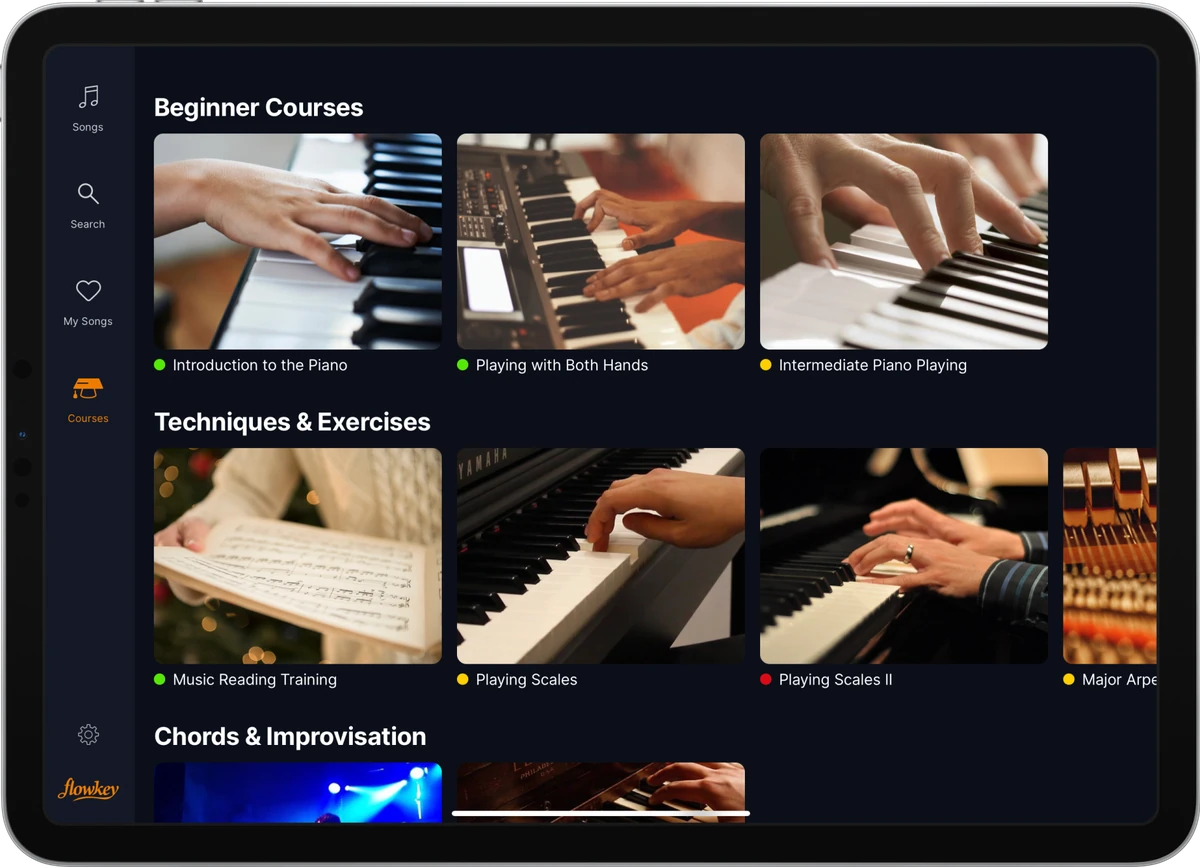
The courses sit alongside the song library, so you can follow a path or dip in when a song needs a new skill. All courses come with both paid plans.
Beginner courses
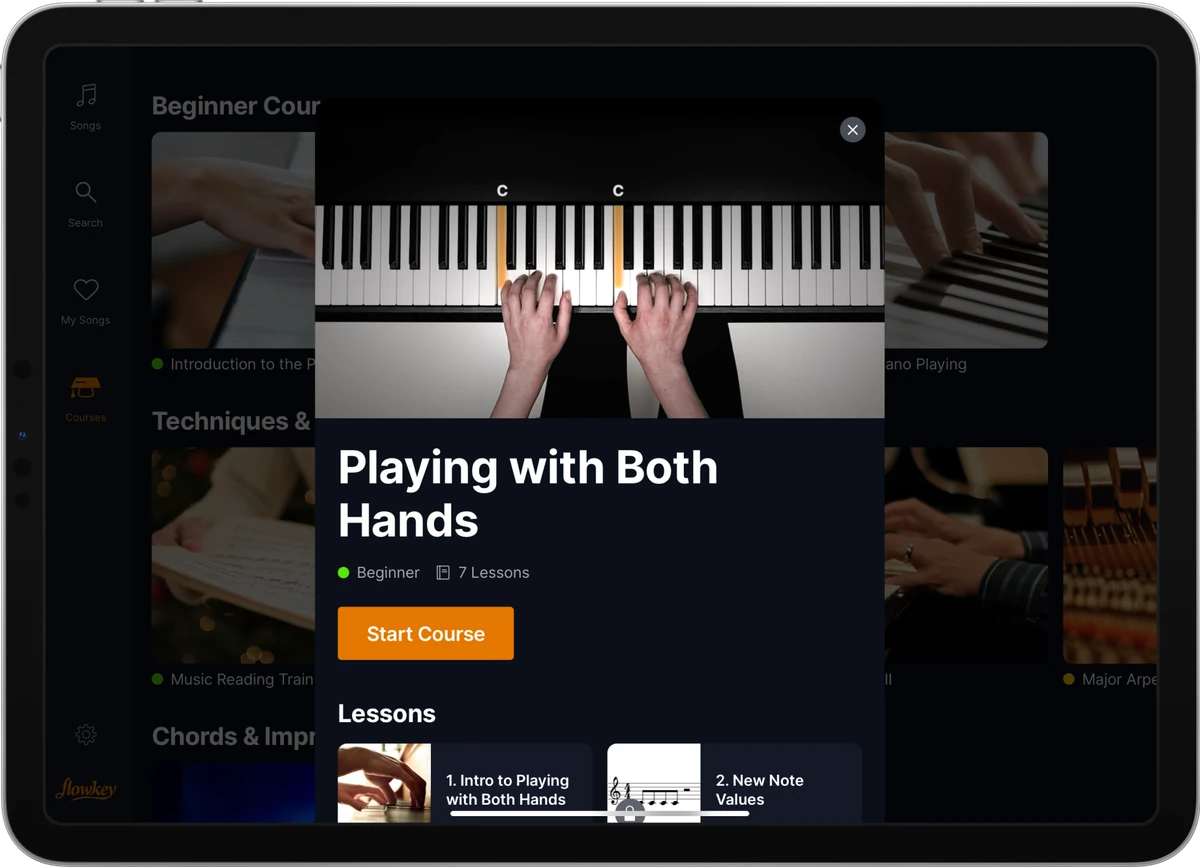
The beginner lessons start with no previous knowledge. They cover proper technique, reading sheet music and playing notes with the right and left hands.
Reading and technique
A set of drills covers scales and arpeggios, and eight lessons focus on sight reading.
Chords and improvisation
Later courses bring in chord progressions, finger crossovers, new time signatures, accompaniment patterns and improvisation. That is where the app moves from copying a piece to understanding how it fits together.
ABRSM exam pieces
Premium includes 21 arrangements from the ABRSM piano syllabus. They use the same real-time feedback, slow mode, looping and hand separation as every other piece.
Songs and practice tools
The song library
The library holds thousands of pieces, arranged by professional pianists for every skill level and updated regularly. Classic covers more than a thousand classical and public domain songs, and Premium adds pop, rock, jazz and music from film, TV and video games.
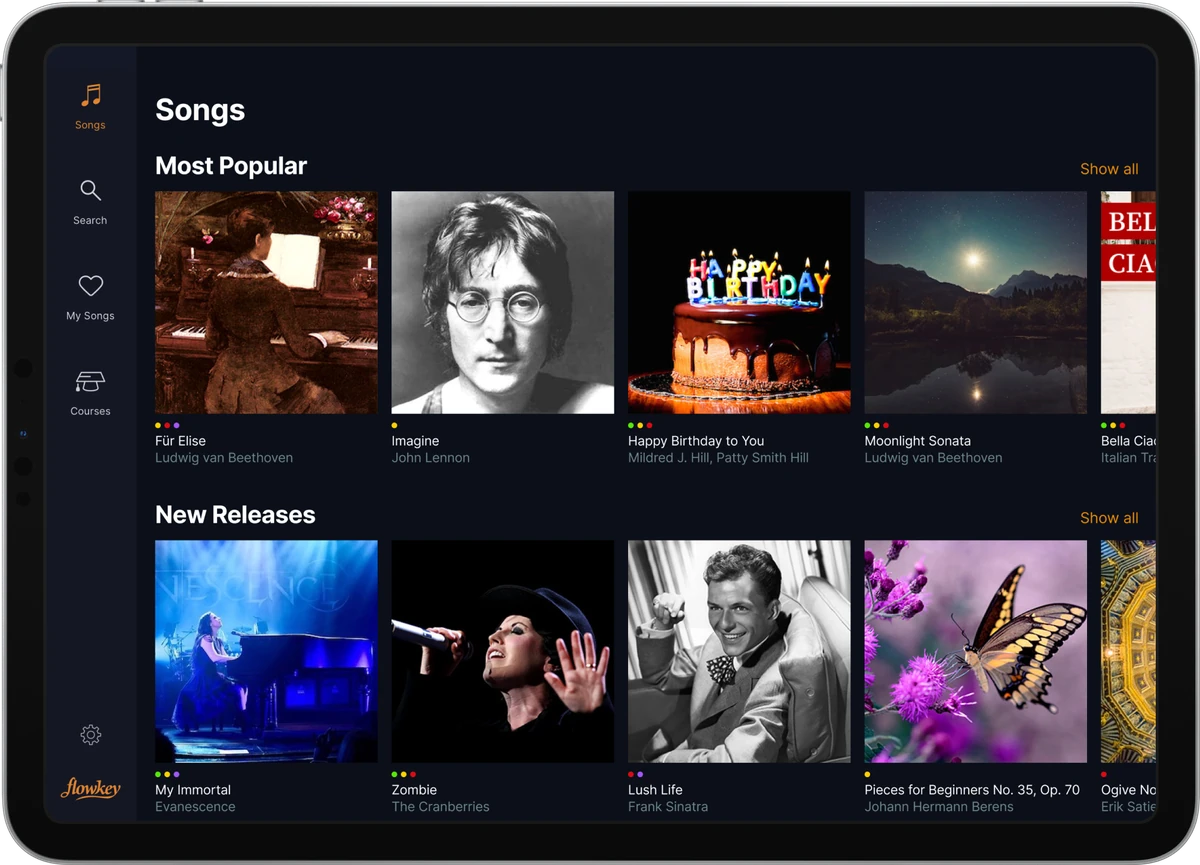
Licensed songs can leave the library when a license ends, and Flowkey gives notice before a song goes. Classical and royalty free pieces stay.
How practice works
Pick a song, choose a hand, slow it down and loop the bar that trips you up. Wait Mode keeps the video paused until you find the right notes, then carries on.
Features and feedback
Feedback and progress
- Note recognition listens as you play and gives real-time feedback through the microphone or a MIDI connection.
- Wait Mode pauses the song until you play the right notes.
- The same feedback runs on the ABRSM exam pieces.
Flowkey’s feedback is automatic: the app’s note recognition checks which notes you play, in real time. The lessons themselves are recorded videos of a pianist’s hands with the sheet music.
Practice tools
- Slow Motion to play at reduced speed.
- Loop to repeat a section until it feels natural.
- Select a Hand to practice the right and left hands separately.
- Headphones: in Wait Mode you can plug headphones straight into a digital piano.
Pros and cons
Where it’s strong
- Video of a pianist’s hands above the sheet music
- Wait Mode listens and waits for the right notes
- Runs in a browser on PC, Mac and Chromebook plus iPhone, iPad and Android
- Works with acoustic pianos by microphone or digital pianos by MIDI
- Free account with a few songs and lessons and no time limit
- 14 day money back guarantee and a 7 day Premium trial on yearly plans
- 21 ABRSM exam pieces on Premium
Where it falls short
- Pop, rock and film songs need Premium; Classic covers classical and public domain music
- Classic and Family plans are sold only through the web app
- Licensed songs can be removed when a license ends
- The free trial comes only with yearly plans, not discounted offers
- MIDI in a browser needs Chrome or another supported browser
- No lifetime plan
Price, trial and refund
Flowkey has a free account and three paid plans, each billed monthly or yearly. The table shows US prices; prices vary by country, and the payment page shows yours before you buy.
| Plan | Regular US price | Includes | Trial | Refund |
|---|---|---|---|---|
| Free account | Free | A few songs and course lessons, all learning features | n/a | n/a |
| Classic | $16.49 a month or $99.99 a year | All courses, plus classical and public domain songs | 7 day Premium trial on yearly plans | 14 day money back guarantee |
| Premium | $24.99 a month or $149.99 a year | Everything in Classic, plus pop, rock, jazz, film, TV and game music and ABRSM pieces | 7 day trial on yearly plans | 14 day money back guarantee |
| Family | $34.99 a month or $224.99 a year | Everything in Premium, for up to five profiles | 7 day Premium trial on yearly plans | 14 day money back guarantee |
We saw no sale on Flowkey’s public pages at our check. Yearly plans are paid up front, every plan renews automatically, and there is no lifetime plan.
Trial, renewal and refunds
The free 7 day Premium trial comes with yearly plans and turns into a yearly subscription unless you cancel at least 24 hours before it ends. Discounted offers do not include a trial.
If Flowkey is not the right fit, there is a 14 day money back guarantee. Cancel at least 24 hours before a renewal; access then runs to the end of the period you paid for.
The App Store and Google Play sell only Premium, and their own terms apply to those purchases. Classic and Family are bought in the Flowkey web app.
Free trial checklist
The 7 day trial is attached to yearly plans, so plan the week before it starts. These checks show whether Flowkey suits your piano and your routine.
- Set up the connection you will really use, microphone or MIDI, and play a free song to check the notes register.
- Try one beginner course lesson and one song at your level in Wait Mode.
- Use slow motion, loop and single hand practice on the hardest bar of a song.
- Search for three songs you want to learn and note whether they need Premium.
- Cancel in the web app settings, or in the App Store or Google Play if you paid there, at least 24 hours before the trial ends if it is not for you.
How it compares
| App | Free option | Devices | How it hears you | Lesson style |
|---|---|---|---|---|
| Flowkey | Free account; 7 day trial on yearly plans | Web browser, iOS, Android | Microphone, MIDI cable, Bluetooth MIDI on iPhone and iPad | Video of a pianist’s hands with sheet music |
| Simply Piano | Two free courses; 7 day trial on yearly plans | iOS, Android, Chromebook | Microphone, MIDI cable, Bluetooth MIDI on iPhone and iPad | App led paths |
| Playground Sessions | 7 day trial | iOS, Android, Windows, Mac | USB or MIDI cable, or microphone for acoustic | Bootcamp with video teachers |
| Skoove | 7 day trial with a 12 month plan | Varies | Microphone or MIDI | Guided course |
Simply Piano
Simply Piano is a phone and tablet app with two free courses and separate melody and chords paths. It suits learners who want an app led path more than video of a pianist. Our Flowkey and Simply Piano comparison puts them side by side.
Playground Sessions
Playground Sessions runs as an app on Windows and Mac as well as phones and tablets, with a structured Bootcamp and video teachers. It suits learners who want a set course with scores at a computer.
Skoove
Skoove is another guided course app with a 7 day trial on its 12 month plan. Our Skoove and Flowkey matchup covers how the two lesson styles differ.
When to choose an alternative
- Choose Simply Piano over Flowkey if you want two free courses and an app led path on a phone or tablet.
- Choose Playground Sessions over Flowkey if you want a structured Bootcamp in a Windows or Mac app.
- Choose Skoove over Flowkey if you want to compare another guided course before a yearly plan.
Who should skip it
- Pop fans on a tight budget: pop, rock and film songs need Premium, not Classic.
- Amazon Fire tablet owners: Flowkey does not support Fire tablets.
- Learners set on a one time purchase: every plan is a subscription, and there is no lifetime option.
FAQs
How much does Flowkey cost?
In the US, Classic is $16.49 a month or $99.99 a year, Premium is $24.99 a month or $149.99 a year, and Family is $34.99 a month or $224.99 a year. Prices vary by country, and the payment page shows yours before you buy.
Is Flowkey free?
Partly. A free account gives you a few songs and course lessons with every learning feature, for as long as you want. The full song library and all courses need a paid plan.
Is there a free trial?
Yes. Yearly plans include a free 7 day Premium trial, which becomes a yearly subscription unless you cancel at least 24 hours before it ends. Discounted offers do not include a trial.
Can I get a refund?
Flowkey offers a 14 day money back guarantee. Purchases made through the App Store or Google Play follow those stores’ terms.
How do I cancel Flowkey?
In the web app, open Settings, then Account, then Unsubscribe. If you paid through the App Store or Google Play, cancel there, at least 24 hours before renewal.
Does Flowkey work with an acoustic piano?
Yes. The app hears an acoustic piano through your device’s built-in microphone. A quiet room and a piano tuned to standard pitch (440 Hz) help it detect every note.
Can I connect a MIDI keyboard?
Yes. Connect by USB or MIDI cable for more reliable note detection, or use Bluetooth MIDI on iPhone and iPad. In a browser, MIDI needs Chrome or another supported browser.
Does Flowkey work on a computer?
Yes. It runs in a web browser on PCs, Macs and Chromebooks with no download, and there are apps for iPhone, iPad and Android.
What is the difference between Classic and Premium?
Classic includes all courses plus classical and public domain songs. Premium adds pop, rock, jazz, film, TV and video game music and ABRSM exam pieces.
Can my family share one subscription?
Yes. The Family plan includes everything in Premium for up to five profiles. It is sold through the Flowkey web app.
Open a free song, set Wait Mode and play the first bars. Use the free account to check that Flowkey hears your piano clearly, then pick the plan that covers the music you want. Our full guide to the best online piano lessons covers every other option.